People browse but don’t buy
Visitors reach your product pages and leave. Usually something they needed to decide is missing, hard to find or only shows up once they reach the cart.
New Shopify stores, redesigns and improvements to the store you already have. Product pages that answer customers’ questions, features that fit how you actually sell, and stores that stay fast as they grow.
Get in touchOfficial Shopify Partner, working remotely with brands anywhere in the world.
Signs it’s time
Most stores don’t need a rebuild. They need the right few things fixed, in the right order.
Visitors reach your product pages and leave. Usually something they needed to decide is missing, hard to find or only shows up once they reach the cart.
Questions about sizing, compatibility, delivery or what’s in the box land in your inbox instead of being answered where people make the decision.
Each app adds its own scripts and settings. Over time they slow pages down, clash with each other and add to your monthly costs.
Bundles, add-ons and configurable products get squeezed into a standard product page that can’t show what the customer is actually buying.
The theme has been edited so many times that a small update needs a developer, or quietly breaks something else.
Prices, currencies, shipping and stock differ by market, but the store was set up for one.
Why it matters
Shopify’s checkout is fast and familiar to shoppers. Most of what you can improve happens before it.
7 in 10
online shopping carts are abandoned before purchase, averaged across 50 studies.
Baymard Institute40%
of shoppers who abandoned a checkout said extra costs such as shipping, tax and fees were too high. Another 12% couldn’t see the total cost upfront.
Baymard Institute, US shopper survey9.1%
more mobile shoppers went from a product page to adding to their basket when retail sites loaded 0.1 seconds faster.
Google study with Deloitte, 37 brandsThe pattern is the same in most stores. People leave when they can’t answer a question for themselves, when the total cost or delivery time comes as a surprise, or when pages are slow on a phone.
That’s why the work starts with the product page and the path to the cart: what customers need to see before they commit, how quickly it loads, and whether anything gets in the way.
A good fit for
Ecommerce brands launching a store, outgrowing their theme or improving an established shopping experience.
A new store or a redesign of your current one. Navigation and collections that match how people shop, product and collection templates built around your catalogue, and pages your team can edit without touching code.
Clear options, delivery and returns information near the add-to-cart button, sizing and compatibility details, and images that show exactly what’s included. The Shopify product page checklist covers what to look for.
Custom builders for products with options, add-ons or bundles, built into your theme so they load quickly and work with your stock and fulfilment. No extra app, and no monthly fee that grows with your sales.
Custom sections for your existing theme, removal of code left behind by old apps, and fixes for the workarounds that make every update risky.
A look at every app and script loading on your key pages. Apps that earn their place stay, anything the theme can do moves into it, and load times are checked before and after.
Connect the store to Klaviyo, Google Analytics and Google Ads conversion tracking, and set up selling in more than one country, through Shopify Markets or separate stores.
Start with one product template and the path from choosing an option to adding it to the cart. The existing theme is reviewed, the agreed changes are built, and the selected product and cart paths are checked on mobile and desktop.
The product, template boundaries, review points and acceptance checks are agreed before development. Extra templates and store-wide changes are scoped separately.
Before scoping the work, use the Shopify product page checklist to identify what customers need to choose an option and add it to the cart.
Discuss a product-page improvement
In practice
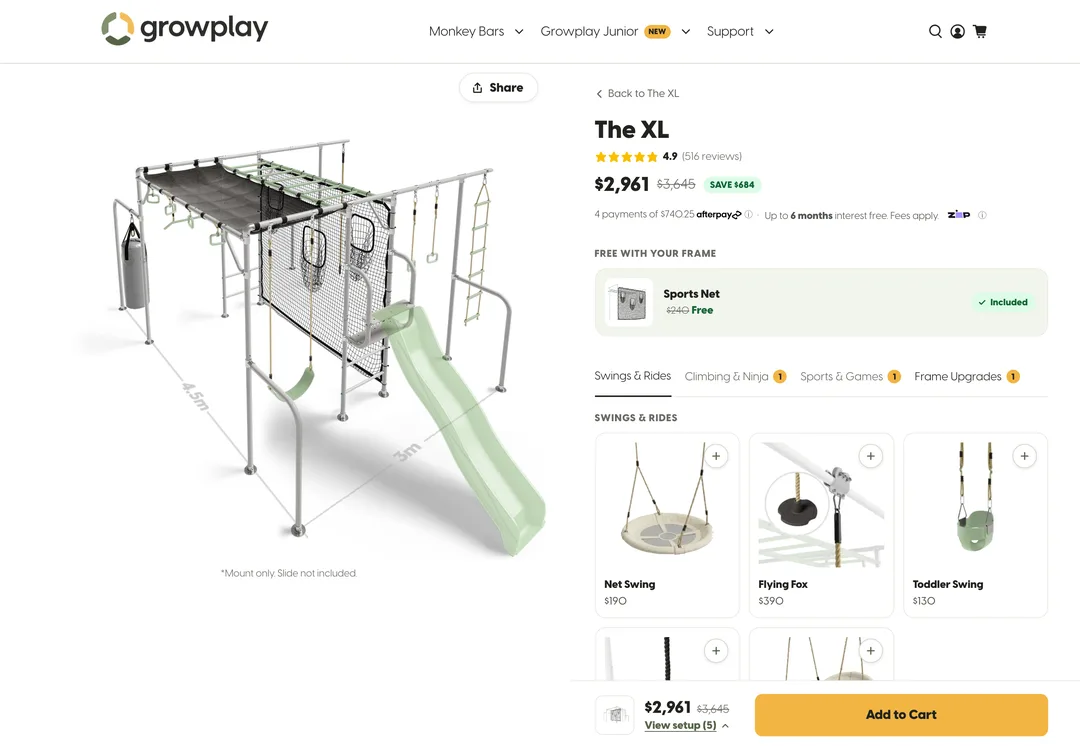
Growplay sells modular outdoor play equipment through four Shopify stores: Australia, New Zealand, the UK and the US.
Its frame builder used to run on a third-party app that was slow, unreliable and couldn’t keep up with how Growplay stocks and ships its frames. It was replaced with a custom builder inside Growplay’s own theme. It loads faster, and customers now add more accessories per order.
Other work includes the Growplay Junior range redesign and the launches in New Zealand, the UK and the US.
Read the Growplay case studyA look at your catalogue, theme, apps, analytics and how customers currently buy, then a recommendation on what to change first.
You get a written scope covering the pages and features, what’s out of scope, review points and how each part will be checked before launch.
Changes are built on an unpublished copy of your theme, so you can review them on your own store while customers keep shopping as normal.
The key product, cart and checkout paths are tested on mobile and desktop, the changes go live and what to measure next is agreed.
What you’ll need to provide
Yes. The theme and any customisations are reviewed first, then you get a recommendation on whether to improve it or use a different starting point. Read how to customise your Shopify theme or rebuild before choosing the scope.
Apps are often the right answer, especially for reviews, subscriptions or shipping rules. Custom theme code makes sense when an app slows your key pages down, costs more as you grow or can’t do what your products need. The recommendation is whichever suits your store.
Yes. Product builders and configurators are built inside your theme. Options, pricing rules, stock and fulfilment requirements are agreed before development. See how Growplay’s frame builder works.
They shouldn’t. Load times on your key pages are checked before and after changes, and scripts that aren’t needed are left out.
Not for most work. Store builds, product pages, builders and theme improvements work on any Shopify plan. Some checkout customisations need Shopify Plus, and you’ll know early if your scope includes one.
Yes. Growplay launched stores in New Zealand, the UK and the US alongside Australia, and the work is done remotely for brands anywhere in the world.
Yes. Shopify can be connected to Klaviyo for email and to Google Analytics and Google Ads for conversion tracking, so you can see which campaigns lead to sales. Klaviyo email marketing and Google Ads management are available too if you want help running them.
Yes. A focused product-page change or store improvement can be a sensible starting point. You don’t need to commit to a full rebuild.
Yes. Kleari is a Shopify Partner and a Klaviyo partner.
What customers need to see before they choose an option and add it to the cart.
How to decide between improving the theme you have and starting again.
The automated emails that bring people back after they leave.
Have something in mind?